
AnimatedSprite
<AnimatedSprite /> displays 2D animations defined in a texture atlas. A typical <AnimatedSprite /> will use:
- An image containing multiple sprites
- A JSON atlas containing the individual sprite coordinates in the image
Usage
<script setup lang="ts">
import { AnimatedSprite } from '@tresjs/cientos'

const currentAnimation = ref('cientosIdle')
</script>

<template>
  <TresCanvas>
    <Suspense>
      <AnimatedSprite
        image="https://raw.githubusercontent.com/Tresjs/assets/main/textures/animated-sprite/cientosTexture.png"
        atlas="https://raw.githubusercontent.com/Tresjs/assets/main/textures/animated-sprite/cientosAtlas.json"
        :animation="currentAnimation"
      />
    </Suspense>
  </TresCanvas>
</template>
<AnimatedSprite /> loads resources asynchronously, so it must be wrapped in a <Suspense />.Compiling an atlas
In typical usage, <AnimatedSprite /> requires both the URL to a texture of compiled sprite images and a JSON atlas containing information about the sprites in the texture.
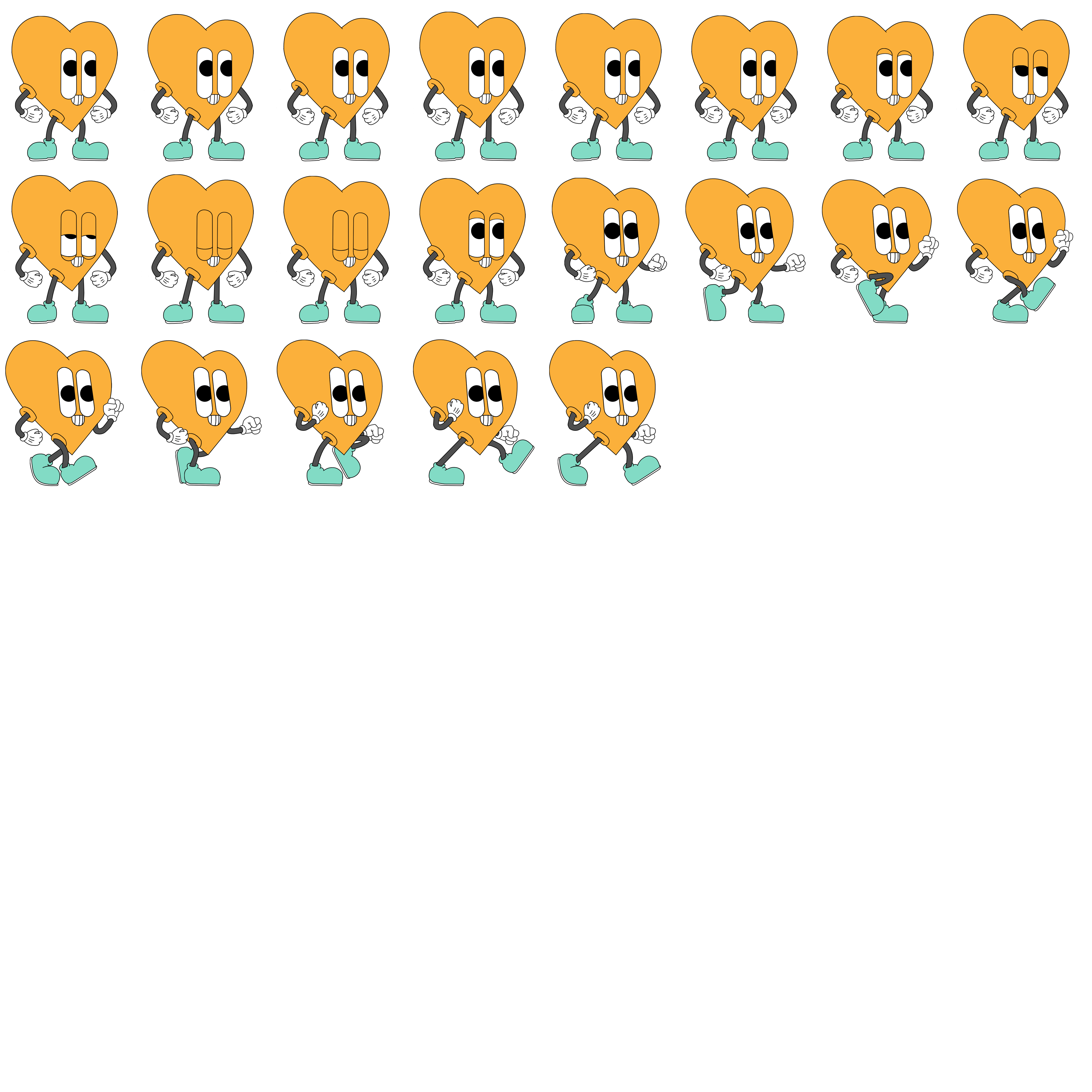
Compiling source images into a texture atlas is usually handled by third-party software. You may find TexturePacker useful.
Without an atlas
There may be cases where you don't want to supply an atlas to the atlas prop. To do so:
- Compile your source images into a single image texture.
- Space each sprite into equally sized columns and rows in the compiled image texture.
- Ensure no extra padding has been added to the compiled image texture.
- Set the
atlasprop to number of columns, number of rows as[number, number].
Spritesheets in the wild
<AnimatedSprite />. In many cases, it's advisable to recompile the spritesheet.How to recompile an existing spritesheet image
- Cut individual sprites from the spritesheet and paste them into separate layers in an image editing application, e.g., GIMP.
- Align the layers for animation. Toggling layer visibility on/off will show you how the animation will display, frame to frame.
- Export layers as individual images.
- Name the individual images according to the following pattern:
[animation name][frame number].[extension]
E.g., walk000.png, walk001.png, idle000.png, idle001.png - Compile individual images into an image texture and atlas using a texture packing application, like TexturePacker.
Props
| Name | Description | Default |
|---|---|---|
| image | string – URL of the image texture or an image dataURL. This prop is not reactive. | |
| atlas | string | Atlasish –
This prop is not reactive. | |
| definitions | Record<string, string> – Specify playback frame order and repeated frames (delays). definitions is a record where keys are atlas animation names and values are strings containing an animation definition.A "animation definition" comma-separated string of frame numbers with optional parentheses-surrounded durations. Here is how various definition strings convert to arrays of frames for playback:
| |
| fps | number – Desired frames per second of the animation. | 30 |
| loop | boolean – Whether or not the animation should loop. | true |
| animation | string | [number, number] | number – If string, name of the animation to play. If [number, number], start and end frames of the animation. If number, frame number to display. | 0 |
| paused | boolean – Whether the animation is paused. | false |
| reversed | boolean – Whether to play the animation in reverse. | false |
| flipX | boolean – Whether the sprite should be flipped, left to right. | false |
| resetOnEnd | boolean – For a non-looping animation, when the animation ends, whether to display the zeroth frame. | false |
| asSprite | boolean – Whether to display the object as a THREE.Sprite. See THREE.Sprite | true |
| center | TresVector2 – Anchor point of the object. A value of 0.5, 0.5 corresponds to the center. 0, 0 is left, bottom. | [0.5, 0.5] |
| alphaTest | number – Alpha test value for the material. See THREE.Material.alphaTest | 0.0 |
| depthTest | boolean – Depth test value for the material. See THREE.Material.depthTest | true |
| depthWrite | boolean – Depth write value for the material. See THREE.Material.depthWrite | true |
Events
| Event | Description | Argument |
|---|---|---|
frame | Emitted when the displayed animation frame changes – at most once per tick, frames may be dropped | string – Name of the newly displayed frame |
end | Emitted when the animation ends – props.loop must be set to false | string – Name of the ending frame |
loop | Emitted when the animation loops – props.loop must be set to true | string – Name of the frame at the end of the loop |
Animation
The :animation prop holds either the name of the currently playing animation or a range of frames to play, or a frame number to display.
Using named animations as animation
When individual files are converted to a spritesheet/atlas, typically the original images' filenames will be included in the atlas.
<AnimatedSprite /> uses those filenames to automatically group images into animations.
Use either of the following naming conventions for your source images ...
[animation name][frame number].[file_extension][animation name]_[frame number].[file_extension]
... then <AnimatedSprite /> will automatically make all [animation name] available for playback. Just pass [animation name] to the component's :animation prop.
Example
For our Cientos heart cartoon character animation, here's how the filenames map to animation names.
| Filenames | Animation name |
|---|---|
| cientosIdle0000.png, cientosIdle0001.png, ... | cientosIdle |
| cientosIdleToWalkTransition0000.png | cientosIdleToWalkTransition |
| cientosWalk0000.png, cientosWalk0001.png, ... | cientosWalk |
Definitions
You can supply an object to the :definitions prop. Any named animation can be a key. The value is a string that specifies frame order and delays.
Demo
In this demo, the 'idle' animation is comprised of six different images. By default, those images will play sequentially when the :animation prop is 'idle'.
But below, we've added a :definitions prop with this value for the idle key:
'0-5, 0(10), 1-2, 3(20), 4-5, 0-5(3)'
So, instead of playing images 0-5 sequentially, this animation will play instead:
0-5– Play all six images (0-5) of the animation normally.0(10), 1-2, 3(20), 4-5– Play all six images again with a delay of ten frames at the bottom of the bounce (0(10)) and a delay of twenty frames at the top of the bounce (3(20)).0-5(3)– Finally, play all six images of the animation with a delay of three frames each.
Center
In addition to being the sprite's anchor point, the :center prop also controls how differently sized source images will "grow" and "shrink". Namely, they "grow out from" and "shrink towards" the center.